When an order is placed, the API stock check feature in MarketPush makes a real-time call to the seller's distributor API (such as Waldom or Master Electronics) to verify current inventory quantities before the order is confirmed — if the live quantity differs from what's on record, the offer is updated automatically to reflect accurate availability. To enable this feature, operators navigate to the seller's record in the Sellers section, click the Settings tab, scroll to Live API Setting, and enter the seller's API URL and API Key provided by their distributor; once saved, all subsequent orders for that seller will include a live inventory check.
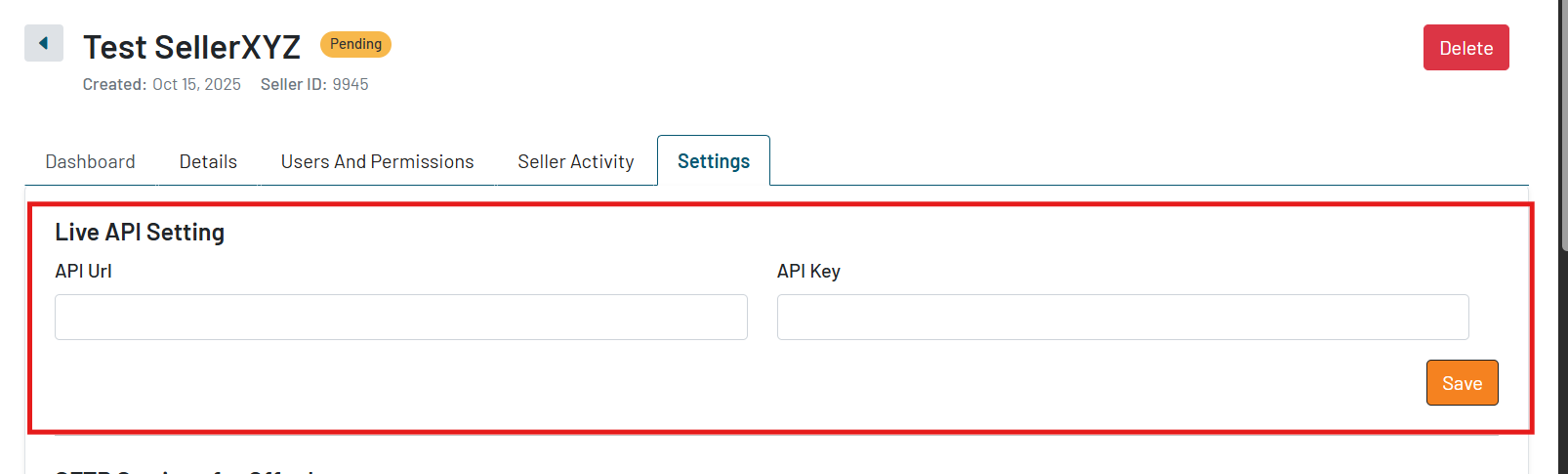
Note: The API Stock Check feature only calls for stock quantity at this time. It does not call for pricing or any other offer conditions.
Was this article helpful?
That’s Great!
Thank you for your feedback
Sorry! We couldn't be helpful
Thank you for your feedback
Feedback sent
We appreciate your effort and will try to fix the article